Always-On AI Agents Are Here: What You Should Know Before Giving AI Access to Your Digital Life
Artificial intelligence is moving beyond the chatbot.
For the past few years, using AI usually meant opening an app, typing a question, receiving an answer, and closing the conversation.
That model is beginning to change.
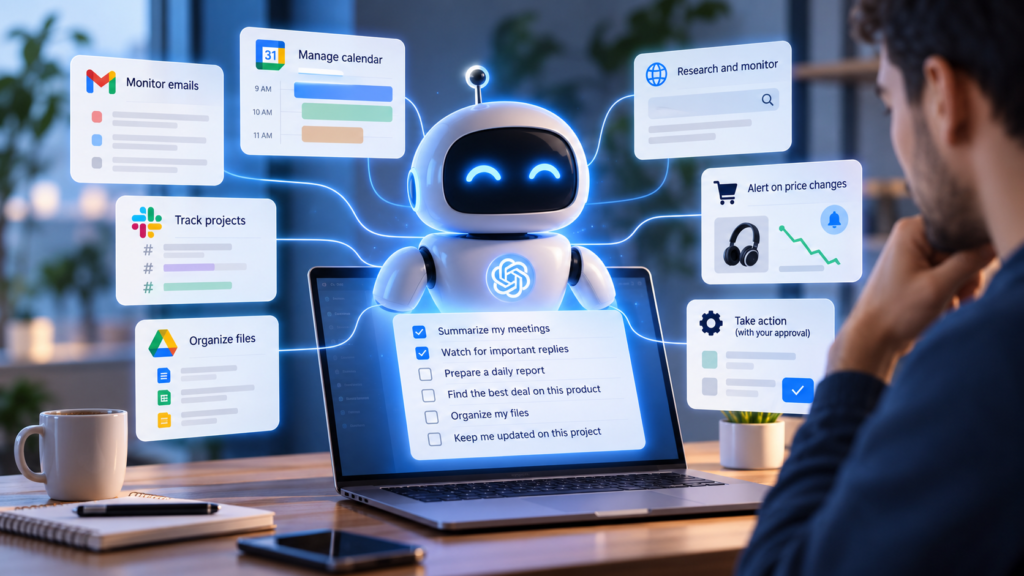
A new generation of always-on AI agents is designed to remain available in the background, remember context, monitor tasks, connect to your apps, and sometimes take action without waiting for you to manually prompt them every time.
This could become one of the biggest changes in personal computing since smartphones.
But giving an AI assistant access to your email, calendar, files, browser, messages, and online accounts also creates an obvious question:
How much control should we actually give AI?
What Is an Always-On AI Agent?
A traditional chatbot reacts.
An AI agent can act.
An always-on or persistent AI agent goes one step further. Instead of completing a single conversation and stopping, it can remain connected to your digital environment and continue working toward longer-term goals.
For example, you could ask an agent to:
- watch your inbox for an important reply;
- prepare a daily summary of your meetings;
- research products and alert you when prices change;
- organize files;
- monitor a project;
- prepare reports;
- interact with connected business tools;
- or handle repetitive administrative work.
The important difference is persistence. You don’t necessarily need to start from zero every time.
Why AI Companies Are Moving in This Direction
The AI industry is increasingly competing on what assistants can do, not simply what they can say.
OpenAI, Google, Meta and other major AI companies are building systems intended to become more deeply integrated into everyday digital activities. We recently compared that race in OpenAI vs Google vs Meta: Who Is Winning the AI Agent Race?
The goal is clear: AI companies want their assistants to evolve from tools you occasionally consult into digital coworkers that remain available throughout the day.
For users, that could be extremely useful.
“Keep track of everything related to this project and tell me when something needs my attention.”
Instead of repeatedly checking email, messages, documents and calendars yourself, an agent could potentially monitor those systems for you.
The Productivity Opportunity Is Huge
Always-on agents could eliminate a surprising amount of digital busywork.
You might spend time checking several inboxes, moving information between apps, looking for documents, summarizing meetings, following up with people, updating spreadsheets, checking dashboards, or repeatedly searching for the same information.
An AI agent connected to the right tools could automate parts of this workflow. For freelancers and small businesses, this could be especially powerful: a single person could potentially operate with something resembling a small virtual team.
But that convenience comes with a trade-off.
The More Useful an AI Agent Becomes, the More Access It Needs
An assistant cannot manage your email without reading email. It cannot schedule meetings without accessing your calendar. It cannot organize your documents without seeing your files.
That creates a new privacy equation. Traditional software usually receives access to a specific category of information. AI agents may eventually connect several categories together.
An agent could potentially know your contacts, conversations, appointments, documents, browsing activity, work projects and preferences.
That level of context makes an assistant more useful. It also makes security failures more consequential. We covered this risk in more detail in The Hidden Security Risks of AI Agents Nobody Is Talking About.
AI Agents Can Make Mistakes — and Actions Matter More Than Answers
If a chatbot generates a wrong answer, you can ignore it. If an AI agent performs the wrong action, the consequences may be different.
It could send the wrong message, modify the wrong document, buy the wrong product, share information with the wrong person, or misunderstand an instruction.
This is why the transition from generative AI to agentic AI matters so much. AI is no longer only generating content. It is increasingly being given permission to interact with real systems.
We are already seeing this shift reach everyday communication. See AI Agents Are Coming to Your Text Messages — Here’s What Changes.
Five Rules Before Giving an AI Agent Access to Your Accounts
1. Start With the Minimum Permissions
Do not give an AI agent access to your entire digital life simply because the option exists. Start with the smallest amount of access necessary.
2. Keep Human Approval for Important Actions
For high-impact actions, human confirmation remains valuable. Purchases, financial transactions, deleting files, sending sensitive messages and changing important settings should ideally require approval.
3. Review Connected Apps Regularly
Periodically check which applications and accounts your AI assistant can access. Remove connections you no longer use.
4. Separate Monitoring From Acting
There is an important difference between “Tell me when something changes” and “Take action whenever something changes.” For many workflows, monitoring is enough.
5. Treat AI Access Like Employee Access
If you wouldn’t give a new employee unrestricted access to a particular account, don’t automatically give that access to an AI agent either. Use permissions based on need.
Are Always-On AI Agents Worth Using?
Probably — for the right tasks.
Persistent AI assistants could become extremely useful for repetitive work, monitoring, research, organization and administrative tasks.
The mistake would be assuming that maximum access automatically produces maximum productivity.
The best AI workflows will likely combine three things: automation, permission limits, and human oversight.
The Bigger Shift: From Apps to Digital Workers
For decades, we adapted ourselves to software. We opened applications, navigated menus and manually moved information between systems.
AI agents could reverse part of that relationship.
Instead of constantly operating software yourself, you may increasingly tell an AI what outcome you want and allow it to operate software on your behalf.
Chatbots answered questions. Agents perform tasks. Always-on agents could eventually manage entire workflows.
Final Thoughts
Always-on AI agents could save enormous amounts of time. They may monitor information, coordinate tasks, organize work and take care of repetitive digital chores while we focus on higher-value decisions.
But the most capable assistant is not necessarily the assistant with access to everything.
The smarter approach is controlled delegation.
Give AI enough access to be useful. Keep meaningful limits. And reserve final control for the actions that truly matter.
The future of AI isn’t only about what your assistant can do — it’s about what you choose to let it do.